
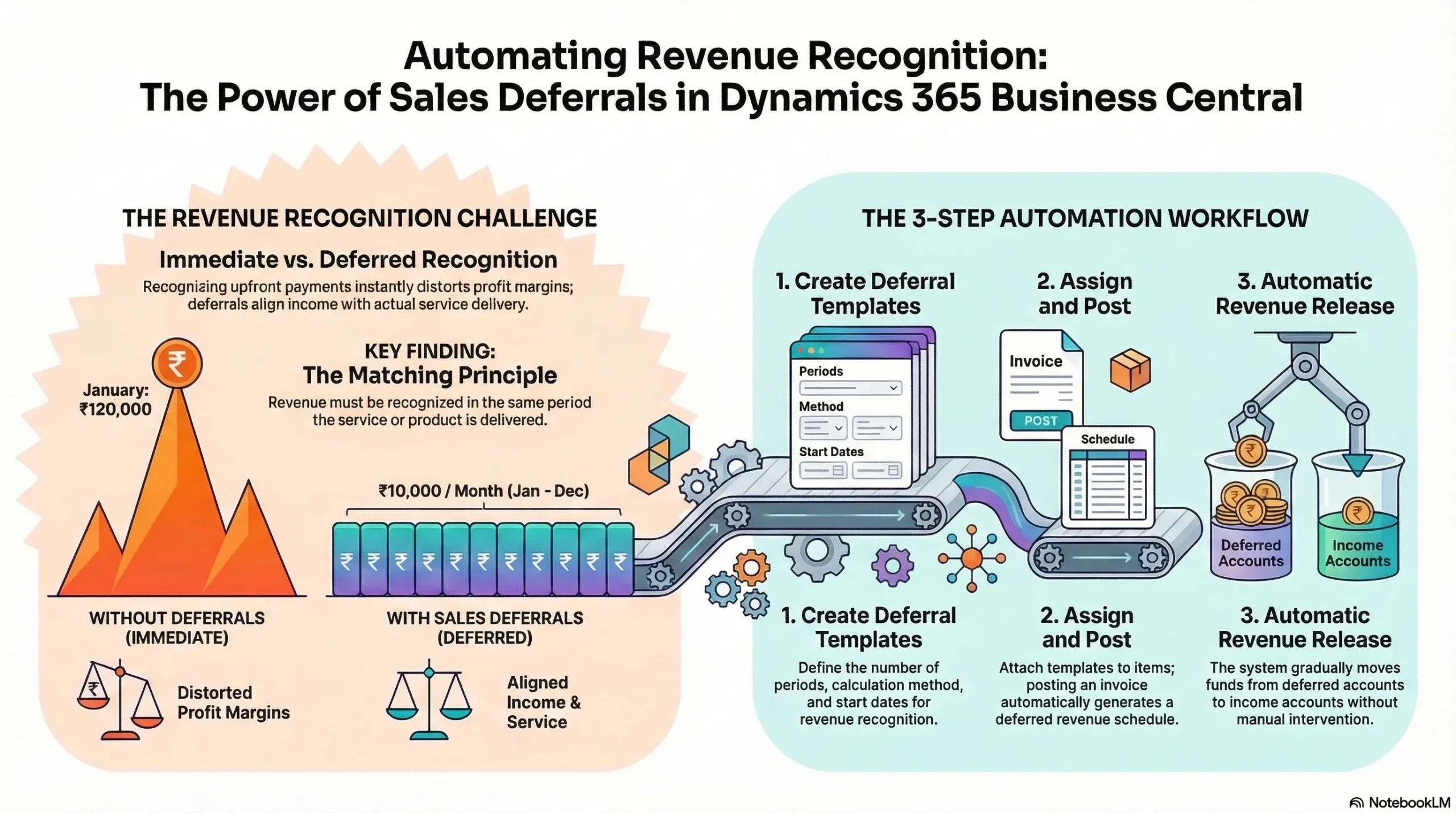
Many organizations invoice customers upfront for services that will be delivered over several months or even years. Without a proper system in place, this can lead to inaccurate financial statements and misleading profit reports.
Dynamics 365 Business Central provides a powerful feature called Sales Deferrals that helps businesses automate revenue recognition. Instead of recognizing the entire revenue amount immediately, the system distributes the revenue across multiple accounting periods automatically.
In this guide, you will learn how Sales Deferrals work in Dynamics 365 Business Central, the problems they solve, and how businesses can implement them to improve financial accuracy and compliance.
The Revenue Recognition Challenge in Modern Businesses
Many businesses operate on subscription models, service contracts, or prepaid agreements. In these situations, customers are often invoiced upfront for services that will be delivered gradually over time.
Example Scenario
Consider a company selling a 12-month software subscription:
- Total invoice amount: ₹120,000
- Service period: 12 months
- Payment: Received upfront
If the company records the entire ₹120,000 as revenue in the month the invoice is issued, the financial records will not reflect the actual service delivery timeline.
Why This Becomes a Problem
Recognizing the entire revenue at once can cause:
- Distorted financial statements
- Inaccurate profit margins
- Poor financial forecasting
- Non-compliance with accounting standards
This is where revenue deferral becomes essential.
Understanding the Matching Principle
The matching principle in accounting states that revenue should be recognized in the same period in which the related service or product is delivered.
In other words:
- If a service lasts 12 months...
- Revenue should be recognized over those 12 months.
Instead of recording the entire revenue immediately, the income should be distributed across the service period. This ensures that financial reports accurately reflect business performance.
What Are Sales Deferrals in Dynamics 365 Business Central?
Sales Deferrals in Dynamics 365 Business Central allow businesses to automatically spread revenue across multiple accounting periods.
Instead of posting revenue directly to the income account when an invoice is created, Business Central temporarily records the amount in a deferred revenue account. The system then gradually releases the revenue into the income account according to a predefined schedule.
Key Components of Sales Deferrals
Sales deferrals rely on several important elements:
- Deferral Templates
- Deferral Schedules
- Deferral Accounts
- Automated Posting Entries
These components work together to ensure revenue is recognized correctly over time.
How Sales Deferrals Work in Dynamics 365 Business Central
To understand the automation process, it is helpful to look at the lifecycle of a sales deferral.
Step 1 – Create a Deferral Template
A Deferral Template defines how revenue should be distributed across accounting periods. The template typically includes:
- Number of periods (for example, 12 months)
- Calculation method
- Start date for recognition
- Posting frequency
Once created, this template can be reused across multiple transactions.
Step 2 – Assign the Template to Items or Accounts
The deferral template can be attached to:
- Sales items
- Resource charges
- General Ledger accounts
By assigning the template at the item level, every invoice containing that item automatically follows the defined revenue recognition schedule. This removes the need for manual adjustments.
Step 3 – Post the Sales Invoice
When the sales invoice is posted, Business Central performs two key actions:
- The invoice amount is posted to a deferred revenue account.
- A deferral schedule is generated automatically.
At this stage, revenue is not fully recognized yet.
Step 4 – Automatic Revenue Recognition
Based on the deferral schedule, the system gradually releases revenue into the income account. For example:
- Monthly recognition
- Quarterly recognition
- Custom distribution schedule
This automation ensures that financial records stay aligned with service delivery.
Practical Example of Sales Deferrals
Let’s revisit the subscription example to see the numbers in action.
Scenario: A company sells an annual software subscription.
- Total Invoice: ₹120,000
- Duration: 12 months
- Requirement: Monthly revenue recognition
Revenue Recognition Without Deferrals
| Month | Revenue Recorded |
|---|---|
| January | ₹120,000 |
| February – December | ₹0 |
Result: This creates an inaccurate financial picture.
Revenue Recognition With Sales Deferrals
| Month | Revenue Recorded |
|---|---|
| January | ₹10,000 |
| February | ₹10,000 |
| March | ₹10,000 |
| April | ₹10,000 |
| May | ₹10,000 |
| June | ₹10,000 |
| July | ₹10,000 |
| August | ₹10,000 |
| September | ₹10,000 |
| October | ₹10,000 |
| November | ₹10,000 |
| December | ₹10,000 |
Revenue is now accurately aligned with the service delivery timeline.
Key Benefits of Automating Revenue Recognition
Using Sales Deferrals in Business Central offers several advantages for businesses and finance teams.
1. Accurate Financial Reporting
Revenue is recorded in the correct accounting period, ensuring financial statements reflect actual performance.
2. Compliance With Accounting Standards
Deferrals support compliance with revenue recognition standards and accounting principles.
3. Reduced Manual Work
Finance teams no longer need spreadsheets to track revenue schedules. The ERP system automatically handles calculations and postings.
4. Better Financial Forecasting
When revenue is recognized properly over time, companies can generate more reliable financial forecasts.
5. Improved Audit Transparency
Deferral schedules provide clear documentation of how revenue is recognized across accounting periods. This simplifies audits and compliance checks.
Best Practices for Using Sales Deferrals
Organizations implementing sales deferrals should follow a few best practices to maximize efficiency.
-
Create Standard Deferral Templates
Templates should match common contract durations such as:
- 12-month subscriptions
- 6-month service contracts
- Quarterly agreements
-
Use Clear Naming Conventions
Examples:
12M_SUBSCRIPTION,6M_SERVICE,ANNUAL_SUPPORT. Clear naming makes templates easier to manage. -
Review Deferral Schedules Before Posting
Finance teams should verify schedules to ensure revenue distribution matches the contract terms.
-
Monitor Deferral Reports Regularly
Regularly reviewing deferral entries helps maintain accurate revenue recognition and financial transparency.
When Should Businesses Use Sales Deferrals?
Sales deferrals are especially useful for businesses that bill customers upfront for services delivered over time. Common use cases include:
- Software subscriptions
- Annual maintenance agreements
- Service retainers
- Insurance policies
- Support contracts
- Training programs
- Consulting services
If a product or service spans multiple accounting periods, deferral automation becomes essential.
Why Business Central Is Ideal for Revenue Deferral
Dynamics 365 Business Central integrates revenue deferral directly within its financial management system. This allows businesses to:
- Automate revenue recognition
- Maintain compliance
- Reduce manual accounting errors
- Improve financial transparency
With configurable templates and automated posting schedules, Business Central ensures that revenue is always recognized correctly.
Conclusion
Revenue recognition can quickly become complicated when businesses invoice customers upfront for services delivered over time. Without proper controls, financial statements may not accurately represent company performance.
Sales Deferrals in Dynamics 365 Business Central provide a reliable solution by automating revenue recognition across multiple accounting periods. Through deferral templates, automated schedules, and accurate posting entries, organizations can maintain compliance, reduce manual work, and improve financial reporting accuracy.
For companies operating with subscriptions, service contracts, or prepaid agreements, implementing Sales Deferrals is a critical step toward modern financial management.
Frequently Asked Questions
What is a sales deferral in Business Central? +
A sales deferral allows businesses to spread revenue recognition across multiple accounting periods instead of recording the full amount immediately when an invoice is posted.
How does Business Central automate revenue recognition? +
Business Central uses deferral templates to create schedules that automatically distribute revenue across accounting periods.
Can deferrals be applied to sales invoices? +
Yes. Deferral templates can be attached to items, resources, or G/L accounts, and they automatically apply when invoices are posted.
Why is revenue deferral important? +
Revenue deferral ensures financial statements accurately reflect when services are delivered, helping businesses maintain compliance with accounting principles.